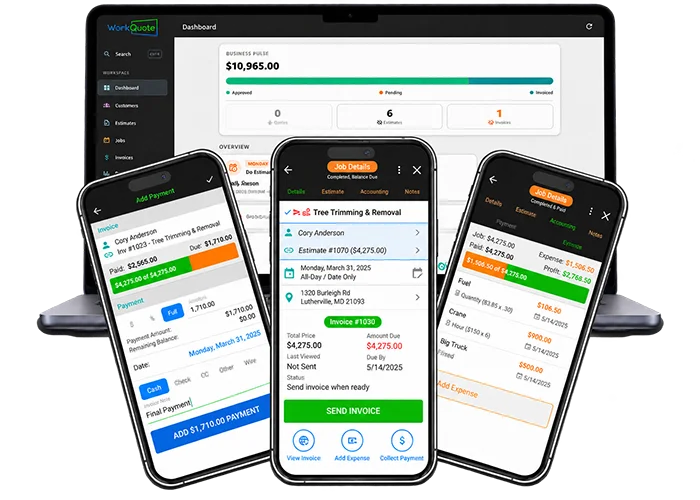
Streamlined Accounting for Service Businesses

Are you spending hours on manual invoices and expense tracking? WorkQuote's Invoice and Accounting features are designed to streamline your financial management and free up your time. With automatic invoice generation, real-time payment tracking, and comprehensive expense management, you can easily keep your business finances organized and up-to-date.
Whether you're a freelancer sending your first invoice or a small business owner tracking job profits, WorkQuote offers the essential tools to handle your accounting tasks with confidence. Stop worrying about bookkeeping and start focusing on what you do best.
WorkQuote Invoice & Payment Dashboard

Invoice Dashboard: Total Financial Control

Invoices are automatically created when a job is marked complete. Use the Invoice Dashboard to view associated payments, expenses, and notes for each invoice. You can also track when clients view their invoices in real-time, giving you valuable insight for timely follow-ups.

  • All invoice details in one place
  • See associated payments, expenses, & notes
  • Real-time client view log
  • One-click next-action suggestions
One-Click Next Invoice Action Suggestions
Multiple Ways To Send Invoices

Flexible Invoice Delivery Options

Send invoices to your clients via email, text, or any sharing app installed on your device. This flexibility ensures your invoices are delivered promptly and securely. Our secure, metadata-friendly links offer a discreet URL that maintains a professional image.

  • Send via email, text, or both
  • Use any installed share app
  • Metadata-friendly links
  • Secure, nondescript URL links
Metadata-Friendly Invoice Links
Add & Track Invoice Deposits & Payments

Accept Online Payments

Connect Stripe to accept online payments from invoices. You can request the invoice total or another amount, such as a deposit. Review the payment status in WorkQuote. Stripe processing fees and terms apply.

  • Allow customer to pay online
  • Full WorkQuote integration
  • Link to any exiting account
  • Free to setup with Stripe
Invoice Payment Details And Notes
Add & Track Invoice Deposits & Payments

Track Every Payment & Job Deposit

Easily track deposits and payments for each job to ensure accurate financial reporting. Monitor payments across multiple jobs and visualize the amounts paid versus amounts due with clear bar graphs, making it easy to see outstanding balances at a glance.

  • Track payments across multiple jobs
  • Easy "paid vs. due" bar graph
  • Save payment type and method
  • Get outstanding invoice reminders
Invoice Payment Details And Notes
Invoice Payment Detail Form Options

Detailed Payment & Partial Tracking

You can easily add and edit payment details, including partial, percentage, or full payments. Track multiple payment types with notes for each one. This feature helps you manage your payments effectively and keeps a clear record of all transactions, even uncollectible write-offs.

  • Partial, percent, or full payments
  • Multiple payment types with notes
  • Track uncollectible write-offs
  • Amounts paid vs. due bar graph
Track Uncollectible Write-Offs and Bad Debt
Send Invoice Receipts With Optional Company Review Request

Automated Client Review Requests

After a client pays, you can automatically send a receipt with an optional request for a company review. This feature allows you to maintain professional communication and encourages positive feedback, all while keeping the process simple and efficient.

  • Auto-request a company review
  • Send via email, text, or both
  • Use any installed share app
  • Invoice receipt lists payments
Include Custom Company Review Request Text
Track Job Expenses For Accurate Financial Reporting

Job Expense Tracking & P&L Reports

Track expenses for each job to get a true picture of your profit and loss. This feature lets you monitor expenses across multiple jobs, visualize profit with bar graphs, and see how expenses affect your income reports.

  • Track expenses from multiple jobs
  • Profit and Loss bar graph
  • See expense percentage of job price
  • Expenses factored into income report
Expenses Automatically Factored Into Income Report
Expense Detail Form Options

Customizable Expense Categories

Easily add and edit expense details, including hourly, quantity, and fixed expenses. Adjust the date of each expense for accurate bookkeeping. All saved expenses are adjustable, allowing you to keep your records up-to-date and accurate.

  • Title and optional description
  • Hourly, quantity, & fixed expenses
  • Adjust date for proper bookkeeping
  • All saved expenses are adjustable
Track Hourly, Quantity, & Fixed Expense Options
Quickly Access Frequently Used Expense Items

Fast Entry for Common Expenses

Save time by quickly adding your frequently used expense items. This feature allows you to add common expenses more efficiently and accurately by eliminating the need to retype basic details. You can easily adjust expense details and save edits for future use.

  • Add expenses fast & accurately
  • No need to retype basic details
  • Easily adjust expense details
  • Save edits for future use
Save Edits To Expenses For Future Use

More Accounting Features to Simplify Work

  • Know when a client viewed an invoice
  • View a list of all open invoices & totals
  • See all invoices with write-offs
  • Payments due visible across the app
  • View invoices pending completion
  • Payments details listed on invoice
  • See a list of all recent payments
  • View every time an invoice is viewed

Get 21 days of Pro. WorkQuote Core is always free.

credit_card_off

No Credit Card Required

No card or payment information is required to start.
rocket_launch

Full Feature Access

Use Pro features with your real jobs during the 21-day trial.
free_cancellation

Nothing To Cancel

At the end of the trial, your account moves to the free Core plan unless you choose to upgrade.

Invoicing & Payments FAQs

Find answers to common questions about our field service software.

You can create an invoice from an approved estimate to reuse its line items and amounts. Review tax settings and invoice details before sending. WorkQuote does not replace tax or accounting advice.

The invoice list shows invoice status, including whether an invoice is sent, paid, or overdue, so you can review balances that may need follow-up.

Yes. Connect Stripe to accept online payments from invoices. Stripe charges transaction fees; review its current pricing and terms before enabling payments.

WorkQuote can export financial reports in available formats such as CSV. Check with your bookkeeper or accounting software provider to confirm the format they need.

You can itemize labor and materials on estimates and invoices and record job expenses. Review those records when evaluating job costs and pricing.

Run your business from anywhere.

Use WorkQuote on your computer, or download the mobile app from the App Store or Google Play. Your account works across all versions.

Available for iOS & Android

WorkQuote Web

Start now - No download needed.

For iPhone or Android, visit Download App.

Check Out More WorkQuote Features

Choose a feature to see how it works.

Features Overview