Service Price & Profit Margin Calculator

Stop guessing. Calculate the exact price you need to charge to hit your profit goals.

Job Costs
Total all labor (fully burdened)
Hrs
Estimated time
Don't forget miscellaneous costs!
Target
20%
We use the Gross Margin Formula (Price = Cost รท (1 - Margin%)), not Markup. If you want to keep 20% of the total price as profit, you need to charge more than a simple 20% markup.
You Should Charge

$0.00

  • Total Labor $0.00
  • Total Materials & Overhead $0.00
  • Net Profit $0.00
Share This Calculation

Done calculating? Start quoting.

Turn your calculations into professional estimates and invoices instantly. Manage your customers, schedule jobs, and track your profitability reports all in one place.

The Hidden Danger of Pricing by Gut Feeling

Why accurate job costing is the difference between a hobby and a profitable business.

The Margin Gap

Many contractors confuse markup with margin. If you add 20% to your costs, you only end up with a 16.6% profit. This tool uses the Gross Margin formula to ensure your profit stays exactly where you need it.

Invisible Expenses

Fuel, insurance, and vehicle maintenance are often forgotten in quick quotes. We help you factor in these overhead costs so you are not paying for the privilege of working for your clients.

The Labor Burden

Your hourly rate must cover more than just a paycheck. It has to account for taxes, benefits, and non-billable time. Our calculator ensures every man-hour is priced for long term growth.

Master Your Job Costing: How to Use the Service Price Calculator

Underpricing is the most common reason service businesses fail to scale. This service price calculator is designed specifically for contractors and professionals who need to move beyond "guesstimating." By factoring in every variable from hourly labor burdens to indirect overhead, you can ensure that every quote you send is mathematically guaranteed to be profitable.

Step 1: Define Your True Job Costs

Before you can determine your selling price, you must account for every dollar leaving your pocket to perform the work:

  • Labor Calculation: Enter your fully burdened hourly rate (including taxes and benefits) and the total estimated man-hours for the project.
  • Direct Expenses: Input the total cost of materials and consumables required specifically for this job.
  • Overhead and Fuel: Use the fuel and overhead fields to account for the costs of getting to the job site and maintaining your business infrastructure.

Step 2: Set Your Target Profit Margin

Unlike simple markup, gross margin ensures your profit is a percentage of the final sale price:

  • The Margin Slider: Adjust the slider to your desired net profit percentage. A 20% to 35% margin is standard for most service industries.
  • Real-Time Adjustments: Watch the breakdown chart update instantly to see how your margin affects your final "You Should Charge" price.

Step 3: Export and Share Your Results

Once you have a price that works for your bottom line, use the built-in sharing tools to save your work:

  • Persistent URLs: Your data is automatically saved in the browser URL. You can bookmark the page or copy the "Share with Data" link to refer back to this calculation later.
  • Professional Quoting: Use the final price as the foundation for your client proposal to ensure you never leave money on the table.

Key Pricing Terms You Should Know

Understanding these terms will help you make informed decisions about your pricing strategy:

  • Gross Profit: This is the money left over after paying for the direct costs of the job (Labor and Materials).
  • Overhead: These are the indirect costs of running your business, such as software, insurance, and shop rent.
  • Net Profit: The actual cash that stays in the business after every single expense and tax has been paid.
  • Job Costing: The process of tracking all expenses associated with a specific project to determine its true profitability.

Quickly Create Free Estimates & Invoices

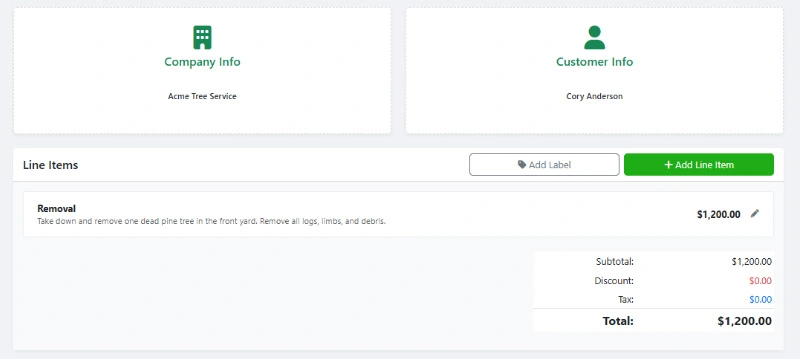
Use WorkQuote's free Estimate & Invoice Generator to create professional quotes and invoices for your service business. No sign-up or account needed.

  • Modern Design: Create professional estimates that look great on any device.
  • Custom Branding: Add your logo and customize colors to match your brand.
  • Live Preview: See real-time updates as you create your estimates and invoices.
  • Real-Time Feedback: Know when estimates are viewed and accepted by your clients.
WorkQuote's Free Estimate And Invoice Generator

Create modern estimates that win jobs!


Organize your Business into one App with WorkQuote

Get It Now

Risk-Free Trial. No Strings Attached.

credit_card_off

No Credit Card Required

Start instantly. We don't ask for a card or any payment information.
rocket_launch

Full Feature Access

Test every feature, from unlimited estimates to scheduling, with your real jobs.
free_cancellation

Nothing To Cancel

If you don't subscribe within 21 days, your trial simply expires. No fees, no obligation.

Service Price & Profit Margin Calculator FAQs

Find answers to common questions about our field service software.

Markup is a percentage added to your cost, while Margin is the percentage of the final selling price that is profit. For example, a 20% markup on a $100 cost results in a $120 price (only 16.6% profit). A 20% margin on a $100 cost results in a $125 price (full 20% profit). Margin is the safer metric for ensuring business overhead is covered.

Your labor rate should not just be what you pay an employee per hour. It must include employer-paid taxes, workers' compensation insurance, health benefits, and any retirement contributions. If you are a solo operator, your rate should reflect the cost of hiring someone else to do the work plus your own profit.

Overhead costs like insurance, software, rent, and tool maintenance exist whether you are on a job site or not. If you do not distribute these costs across your billed hours, those expenses will eat directly into your personal take-home pay at the end of the month.

Once you have determined your profitable price using this tool, you can use the WorkQuote platform to generate a professional, branded estimate. Instead of just sending a number, you can send a detailed breakdown that clients can view and approve online, significantly increasing your professional image and win rate.

Yes! While this calculator is great for quick math, the WorkQuote app allows you to build a full price list of your services and materials. This means you can generate complex quotes in seconds, track your customer history, and even schedule the job on a team calendar the moment the invoice is paid.

Free Contractor Calculators & Business Tools

Streamline your operations and protect your profit margins. Use our free suite of estimating software, ROI calculators, and pricing tools designed specifically for trade contractors.

Estimate & Invoice Generator

Create professional PDF estimates and invoices instantly.

Estimate Manager

Track status, payments, and client history in one place.

Service Price Calculator

Determine profitable pricing based on your overhead costs.

Service Area Map Tool

Visualize your service radius on a map for marketing.

Local Marketing ROI Calculator

Measure the effectiveness of your local ad spend.

Labor Burden Cost Calculator

Calculate true employee costs including taxes and benefits.

Equipment Buy vs. Rent

Compare long-term costs to make smart equipment decisions.

Good-Better-Best Generator

Upsell clients with tiered service package proposals.

Hourly vs. Project Rate

Decide which pricing model maximizes your project profit.

Estimate Follow-Up Generator

Generate persuasive follow-up email templates to close deals.

Download WorkQuote for Advanced Business Tools
Includes a No-Sign-Up Guest Demo Mode.

Disclaimer & Data Policy: This free WorkQuote tool is provided "as is" without warranty of any kind. While we strive to ensure accuracy and reliability, users are responsible for verifying the information and suitability of generated data for their specific needs. WorkQuote disclaims any liability for damages arising from the use of this tool.