There’s a silent killer in the service industry, and it smells like stale coffee, cheap air freshener, and burning gasoline. It’s called "windshield time."
If you run a service business—whether you’re fixing HVAC units, landscaping backyards, or grooming pets—you know the struggle. You quote a job for $150, thinking it’s a quick hour of work. But then you sit in traffic for 45 minutes to get there, and another 45 minutes to get back. Suddenly, that $150 isn't looking so great when you factor in fuel, vehicle wear and tear, and the opportunity cost of the time you wasted.
Many small business owners are terrified to charge for travel. They fear the customer will hang up the phone. But here is the hard truth: if you don’t account for your travel time, you are paying the customer for the privilege of working for them.
That changes today. We are thrilled to announce the release of our newest resource designed specifically for you: the Service Area & Trip Charge Calculator. It’s free, it’s fast, and it’s going to help you stop leaving money on the road.
The High Cost of "Guesstimating"
Early in my career, I worked with a brilliant plumber who nearly went bankrupt. He was the best in the county, but he had a habit of saying "yes" to everyone. If a client called from three towns over (a 90-minute round trip), he took the job. He didn't charge a trip fee because he wanted to be "competitive."
He was burning $40 in fuel and 1.5 hours of billable labor (worth roughly $150) for a job that only paid $200. After materials and taxes, he was essentially working for minimum wage.
The "Invisible" Expenses
When you drive to a job site without a calculated trip charge, you aren't just paying for gas. You are absorbing:
- Vehicle Depreciation: Every mile puts you closer to new tires, oil changes, and repairs.
- Labor Burden: If you have employees, you are paying them to sit in the passenger seat.
- Opportunity Cost: The time spent driving could have been spent on another billable job or managing your invoices.
Meet Your New Best Friend: The Service Area Calculator
We built the Service Area & Trip Charge Calculator to take the math out of the equation.
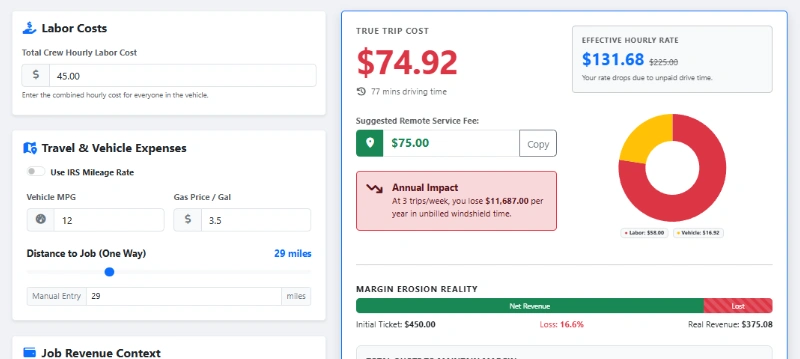
Instead of staring at a map and guessing, you can now input your base location, your hourly labor rate, your vehicle's MPG, and current fuel prices. The tool helps you visualize exactly where your "Profit Zone" ends and where the "Expense Zone" begins.
3 Ways to Structure Your Trip Charges
Once you use our calculator to determine your costs, you need a strategy for presenting this to the customer. You can't just slap a random fee on an invoice without explanation. Here are three professional ways to handle it using modern invoicing software strategies.
The Flat Radius Fee
Best for: High-volume businesses like lawn care or pool cleaning.
Establish a "Home Zone" (e.g., 10 miles). Anything inside is free. Anything between 10-20 miles gets a flat $25 trip charge. Anything 20-30 miles gets $50. It’s simple, easy to explain, and easy to automate in your quoting app.
The Hourly Travel Rate
Best for: Specialized trades like electricians or emergency plumbers.
If your hourly rate is $100, you charge for travel time at a reduced rate (e.g., 50% of your labor rate) or full rate for emergency calls. This ensures that if you are stuck in traffic, the client absorbs that cost, not you.
The Absorbed Cost
Best for: High-ticket renovations or roofing.
You don't show a line item for "Travel." Instead, you use the calculator to find your cost, add a markup, and bake it directly into the line items of the estimate. The customer sees one price, but your expenses are covered.
How to Tell the Customer (Without Losing Them)
The biggest fear contractors have regarding trip charges is rejection. "Why should I pay you to drive here?" asks the skeptical homeowner.
It’s all about framing. If you frame it as a "Gas Fee," it sounds petty. If you frame it as a "Service Call Dispatch Fee," it sounds professional. It signals that there is a cost to deploy a fully stocked truck and a trained expert to their doorstep.
Try this script:
"Our service area covers a 15-mile radius. For locations outside that zone, we apply a modest travel fee to cover the technician's time and vehicle expenses. This allows us to keep our hourly labor rates competitive without cutting corners on service quality."
Transparency builds trust. Using tools like WorkQuote to generate professional estimates that clearly outline these policies prevents billing disputes later.
Pro Tip:
Offer to waive the trip charge if the customer proceeds with the full job (for estimates). This filters out "tire kickers" who just want a free price check, while rewarding serious customers.
From Calculation to Invoice: The Full Workflow
Knowing your travel cost is step one. Step two is ensuring you actually collect it. This is where manual calculations often fall apart. You calculate it on a napkin, but forget to add it to the final invoice, or your field tech forgets to track the mileage.
This is why we integrate these concepts into the broader WorkQuote ecosystem.
- The Ideal Workflow
- 1. Calculate: Use our free tool to establish your zones annually or when gas prices spike.
- 2. Template: Save these fees as "Saved Items" in your WorkQuote app.
- 3. Quote: When a client calls, add the relevant zone fee to the estimate immediately.
- 4. Schedule: Use smart scheduling to group jobs in the same area (reducing the need for the fee in the first place!).
Efficiency isn't just about charging more; it's about driving less. By understanding your service radius, you can start marketing more aggressively in your "Green Zone" (high profit, low travel) and turning down low-margin work in your "Red Zone."
For more on managing your business finances, check out our guide on business reporting features to see which zip codes are actually making you money.
5 Signs You Need a Trip Charge Policy
If you recognize these symptoms, use the calculator immediately.
Fuel costs are over 10%
If fuel exceeds 10% of your operational overhead, you are driving too far for too little.
Traffic determines your day
If you are constantly late to jobs because of unpredictable highway travel, your radius is too wide.
Vehicle maintenance is soaring
Needing tires or oil changes twice as often as the manufacturer recommends? You're eating depreciation costs.
You dread "Small Jobs"
If a customer calls for a simple fix and your gut reaction is annoyance because of the drive, your pricing model is broken.
Competitors are closer
If you are servicing an area where a competitor is based, they have a price advantage on travel. You must account for that.
Stop Leaving Money on the Highway
Your time is your inventory. Every minute spent behind the wheel for free is inventory you just threw out the window.
Take five minutes today. Click the link below, plug in your numbers, and find out what your travel time is actually worth. Then, make sure you have the right app to bill for it.